May 13, 2026
AI MasterClass
Stop Prompting AI. Start Building it.
How to Build an $81M AI Startup in a Weekend
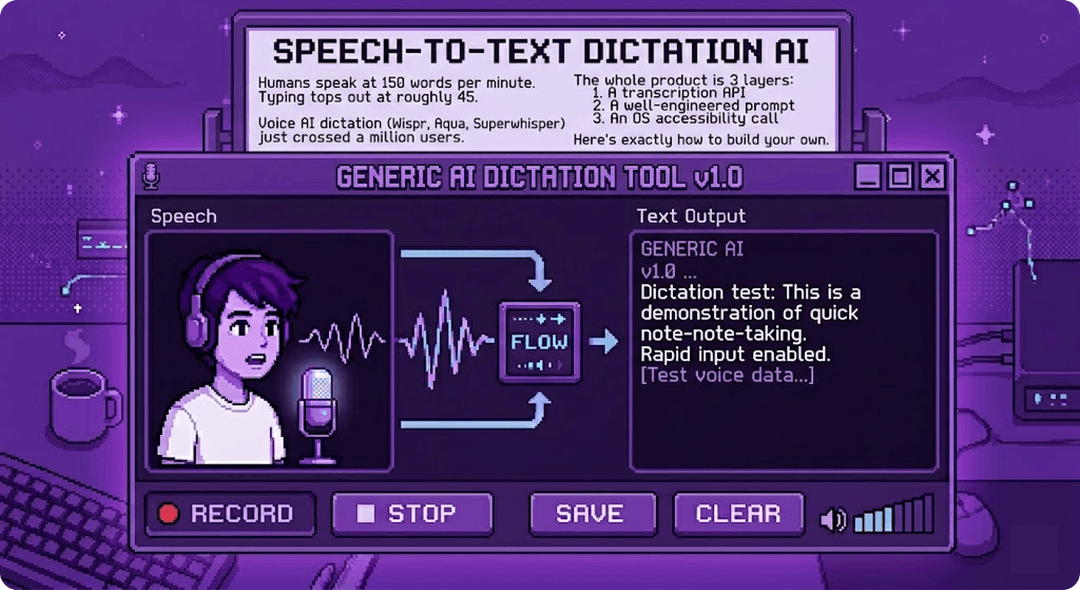
Voice AI dictation is having a moment. Wispr Flow, Aqua Voice, Superwhisper, and a handful of others are racing to replace your keyboard with your microphone. Productivity creators are barely touching their keyboards while clean, polished text appears in Gmail, Slack, Notion, VS Code. The category has crossed a million users collectively and is pulling serious venture funding.
The thesis is simple. Humans speak at 150 words per minute. Typing tops out at roughly 45.If a tool can clean up your rambled thoughts into polished prose, you're 3x faster across every app you use.
So how do you actually build one?
Why this one
There are 50 AI products launching this week. Why are we breaking down this one?
Because it's the rare AI product where you can read a newsletter and ship a working version by Sunday. Three layers. Each one off-the-shelf. A transcription API. A prompt. A clipboard call.That's the whole stack.
Most AI products that look magical are sitting on months of fine-tuning, custom datasets, eval cycles, and infra. Voice dictation isn't like that. The hard parts are taste and polish, not model science. Which means a working engineer can actually build it. And then make it better.
Which also makes it the perfect teaching case. The patterns inside, runtime prompt assembly, tone lookup tables, personal style memory, OS-level app context, these show up in nearly every consumer AI product worth building right now. Learn them on something you can hold in your head, then carry them into harder ones.
And the category is hot. Real users in the millions. Real funding rounds. Real productivity gains people are paying for. There are worse wedges into AI product building.
This one earns its spot.
What the system actually does
The product transcribes and edits. Rambled thoughts become clear, perfectly formatted text without the filler words or typos. It detects which app you're in and adjusts tone automatically. A Slack message sounds different from a legal memo. It learns your personal vocabulary. It works system-wide, in every application.
The system has three jobs:
- Capture and transcribe. Turn raw audio into text, accurately and fast.
- Understand and rewrite. Clean up the transcript into polished prose for the context.
- Deliver. Insert that text into whatever app is in focus.

Layer 1: The Audio Pipeline
For the audio pipeline, Deepgram Nova-3 is the standard pick. Purpose-built for low-latency streaming transcription. It returns partial results as the user speaks, median time to first word under 200ms.OpenAI's Whisper is more accurate on edge cases but requires the full audio clip before processing. For a real-time product, Deepgram wins.
async with client.listen.v1.connect(
    model="nova-3",
    language="multi",
    smart_format=True,
    endpointing=300,
):
    ...
Layer 2: The AI Editing Layer
This is where the real product magic lives. The LLM takes the raw transcript and rewrites it into polished, context-aware text. Three things make it work: a tight system prompt, a tone profile lookup, and a personal style memory.
The system prompt is load-bearing.The rules need to be specific about what to remove versus what to leave alone. The model also needs explicit "never do this" guardrails. Never preamble with "Here is...", never add commentary, never return anything except the rewritten text.
Inside the prompt are two placeholders that get filled in at runtime: {TONE_INSTRUCTION} and {PERSONAL_STYLE_NOTES}. The tone string is just a lookup table. Wispr Flow detects which app is in focus via OS-level accessibility APIs and injects the matching string into the prompt before each call:
python
TONE_PROFILES = {
    "gmail":   "Professional but warm. Complete sentences. Greeting and sign-off if implied.",
    "slack":   "Casual, direct, brief. No formal closings.",
    "notion":  "Clear, structured, informative. Paragraph breaks.",
    "default": "Natural and professional. Match the implied formality.",
}
keyterm = ["Wisprflow", "Nguyen", "SaaS"]
# custom vocabulary, Deepgram layer
The same spoken sentence produces completely different output across apps. That's the entire mechanism.
The style notes layer is what makes the product feel personal. After every edit, the system extracts one repeatable observation about how the user writes ("Signs off with Best, or Thanks", "Calls their product the platform, not the app"). Top notes get injected into the prompt on every call. After a month, the output genuinely sounds like the user.
Layer 3: The Delivery Layer
Once the text is polished, it needs to land inside whatever app the user is writing in. The mechanism is simpler than it looks: save the user's clipboard, write the new text to it, simulate a paste, then restore the original clipboard. This works in every app that accepts paste, which is almost every app. Faster native paths exist for some apps but the paste approach is the universal primary, not the fallback.
The Throughline
At AI Masterclass, you won't just learn how AI applications like this work. You'll learn the underlying principles, engineering, and architecture. Well enough to look at any AI product and know exactly how to build it. And then build something better.
The engineers who go through AI Masterclass will build the next layer, systems that don't just clean up what you say but understand what you're trying to accomplish and act on your behalf.
Go build the next one.
Forward this to a builder who needs to read it.